
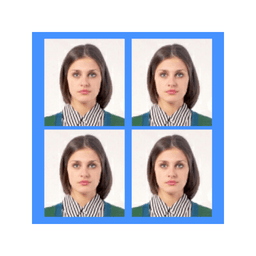
Screenshots
About ID Photo application
Create professional ID photos instantly from your smartphone with the ID Photo application. Transform any portrait into perfectly-sized, print-ready ID photos without visiting a studio or photographer. Whether you need passport photos, employee badges, or official documents, this app handles everything on your device.
Capture or upload a photo, and the app instantly generates ID photos in all standard dimensions. Choose from eight preset sizes including 51×51mm (2×2 inches), 45×35mm, 50×35mm, 48×33mm, 35×25mm (1 inch), 45×45mm, and 40×30mm—or enter custom dimensions for your exact requirements. The flexibility means you're never limited to generic options; if your ID requires an unusual size, simply specify it.
One of the biggest advantages is unlimited retakes. Getting the perfect shot matters, especially for children or anyone uncomfortable in front of a camera. Snap as many photos as needed until you're satisfied, then proceed to create your ID photos. No stress, no wasted trips, no repeated fees.
The app arranges multiple ID photos on a single 4×6 inch (101.6mm × 152.4mm) standard print sheet, maximizing your prints and saving paper and ink. You can specify exactly how many photos fit on each page. Want to include ID photos of different sizes on one print? The app supports that too, giving you complete control over your layout.
Color or black and white—convert any color photo to grayscale for formal documents that require traditional ID photo styling. The finished output is JPEG format, matching standard photo file formats from smartphones and digital cameras, so printing is seamless.
Printing is effortless. If you own a photo printer or any device capable of printing smartphone photos, simply transfer the file and print at home. No special software or equipment needed. You can also save files for later printing or sharing.
The ID Photo application transforms the way you create identification photos. Skip expensive photo studios for routine ID needs and manage everything from your Android device. Professional results, custom sizing, unlimited attempts, and complete creative control—all designed to give you perfect ID photos every time.
Pros & Cons
Pros
- Generate ID photos in eight preset sizes plus custom dimensions
- Arrange multiple photos on single 4×6 inch print sheet efficiently
- Unlimited retakes until you capture the perfect shot
- Convert between color and grayscale for different document requirements
Cons
- Requires manual file transfer to print; no built-in printing integration
- Output limited to JPEG format with no other export options
- No background removal or advanced photo editing tools mentioned
- Device storage needed to save multiple photo attempts and layouts
Related Apps

HWiNFO
Hardware monitoring for Windows—track CPU temp, GPU load, fan speed, voltage in real time.

TransMac
Read Mac drives and DMG files on Windows. Access APFS/HFS+ storage and create disk images.

Advanced SystemCare Free
System optimization tool: clean, repair, and secure your PC. Remove malware, fix errors, and boost performance.

Display Driver Uninstaller (DDU)
Driver uninstaller for GPU and audio — removes residual files for clean Windows updates

Glary Utilities
PC maintenance and optimization suite — clean, repair, and speed up your Windows computer in one action.

Universal ADB Drivers
ADB drivers for Android: Connect any smartphone to Windows PC without manufacturer software.
Latest Articles

7 best apps for birthday reminders on Android in 2026
Jul 12, 2026

Best apps for D&D character sheets on Android in 2026 (7 tested)
Jul 12, 2026
Best apps for gaming on integrated graphics for desktop in 2026 (we tested 7)
Jul 12, 2026
Best apps for live sports streaming on desktop in 2026
Jul 12, 2026

Best apps for movie tracking on Android in 2026 (free and paid)
Jul 12, 2026